
The short answer
Yes, you can budget without linking your bank. A manual budget app has you log each buy yourself, in a tap or by voice, instead of importing transactions through a bank connection. You trade automatic import for no shared bank password, no connection to break, and seeing every buy as it happens. Set your regular buys to log themselves and most people spend under a minute a day.
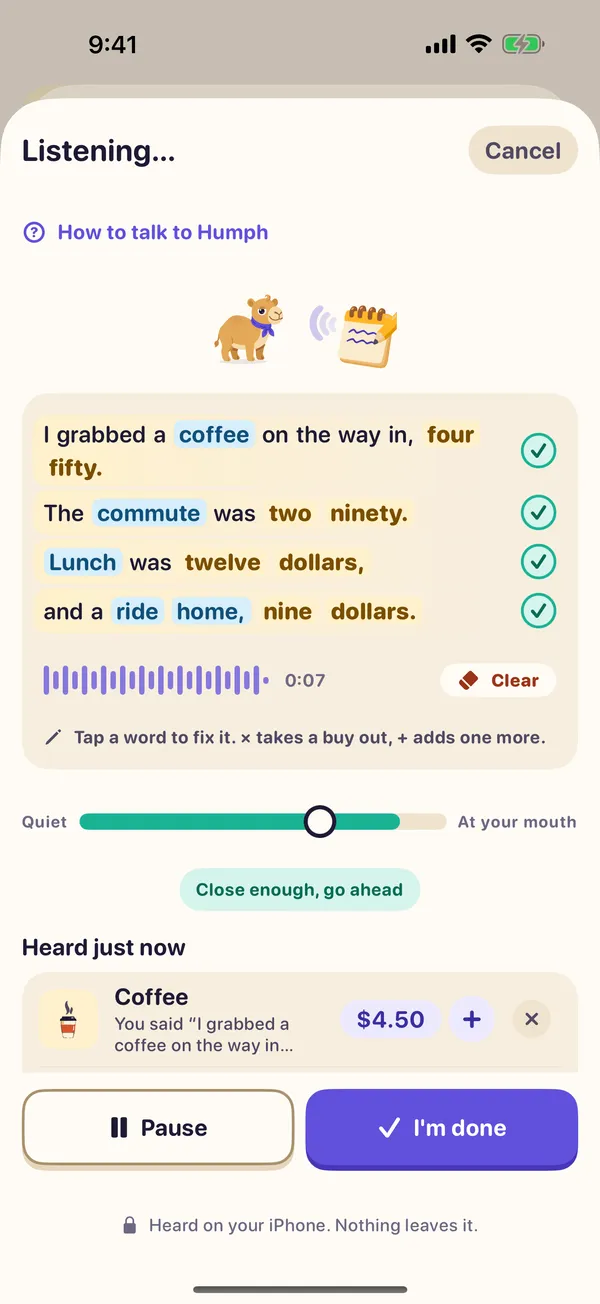
Humph never asks for a bank login: say "lunch 12 and a ride 8.40" and both are logged. No bank login, no spreadsheets. For iPhone, with a 7-day free trial.


A budget app without bank login, also called a manual budget app, has you log each buy yourself instead of importing transactions from your bank. You give up automatic import. In return you share no bank password, nothing can disconnect, and you see every buy as it happens. Here's how it works, what it costs you in time, and who should pick a bank-linked app instead.
Why people skip bank sync
Bank sync sounds effortless, and when it works, it is. It breaks often enough that it's the biggest complaint in budgeting app reviews. We read 1,425 one- and two-star App Store reviews of 30 US budgeting apps in October 2026. 297 of them, across 18 apps, were about sync: connections that drop, buys that show up days late or twice, banks the app can't reach. One Monarch reviewer put it as "sync accounts is a full time job."
The other reasons come up less often but matter to the people who raise them:
- Privacy. They don't want a third party reading every transaction.
- Sign-up walls. Some apps ask for your bank login before you see a price.
- Outside the US. Some apps only connect to US banks.
- Cash. Bank sync never sees the cash in your wallet.
Bank-linked or manual: the honest trade-off
| Bank-linked app | Manual app | |
|---|---|---|
| How buys get in | Imported from your bank, often hours or days later | You log them, in seconds, when you buy |
| Your bank login | Shared with the app or a data company | Never asked for |
| What can break | Connections, duplicates, wrong categories | A buy you forgot to log |
| Cash and other banks | Often missed | Logged like anything else |
| Daily effort | Checking and fixing imports | A few seconds per buy |
| What you notice | Spending after it happened | Spending while it happens |
That last row is the hidden benefit. Typing "coffee 4.50" takes three seconds, and those three seconds make you notice the coffee. An import that shows up on Thursday doesn't.
How to make manual logging fast
The fear with a manual budget app is the typing. Five habits cut it to almost nothing:
- Log at the register. Open the app while you pay. Logging later means remembering, and remembering is where buys go missing.
- Set up your regular buys once. The workday lunch, the commute, the coffee: a good manual app logs them for you on their days, and you only fix the price when it changes.
- Say it instead of typing. "Lunch 12 and a ride 8.40" is faster than two forms.
- Let your phone catch card payments. On iPhone, a Shortcuts automation can open your budget app each time you pay with Apple Pay in a store.
- Close the day at night. Thirty seconds to check today's list catches what you missed while you still remember it.
With these, most people spend under a minute a day. That's less than fixing a week of bad imports.
What to look for in a budget app without bank sync
- One clear number. Without imports, the app has to earn its keep by telling you something useful: what you can spend today, or what's left this week.
- Bills that wait for their day. Rent and the phone bill should stay out of your spending money until they're paid.
- No account needed. If you skipped the bank login for privacy, skip the email sign-up too.
- Your data stays yours. Check where your amounts are stored and whether you can export them.
- A price you can see first. Look for the price on the App Store page before you hand over anything.
Want names? Our app comparisons say which popular apps let you skip the bank, and what each one costs.
When a bank-linked app is the better pick
- You want every card transaction recorded without lifting a finger, and you'll check imports when they go wrong.
- You track net worth, investments or several accounts at once.
- You share a budget with a partner who won't log buys.
If that's you, choose an app built around sync. If you mostly want to stop running out of money before payday, manual logging gives you the same answer with less to go wrong.
Questions people ask
Can I use a budget app without connecting my bank?
Yes. Manual budget apps work without any bank connection: you log buys yourself. Some bank-linked apps also let you skip the connection and enter buys by hand.
Is it safe to link my bank to a budget app?
Most apps connect through a data company with read-only access, and the big ones take security seriously. The problems people report in reviews are more often connections that drop, duplicate buys or lag by days. If sharing your login makes you uneasy, a manual app avoids the question.
Doesn't manual entry take forever?
It takes a few seconds per buy if you log when you pay. Set up your regular buys once so they log themselves, and use voice or an Apple Pay automation for the rest. Most people spend under a minute a day.
Can a manual budget app track cash?
Yes, and better than a bank-linked one. Cash never reaches your bank feed, so a synced app misses it. In a manual app, a cash buy is logged like any other.
Do I need an account?
Not always. Some manual apps, Humph included, need no account or email and keep your data on your phone and in your own cloud storage.
A budget app with no bank login, made for payday
Humph never asks for your bank login or an account. Tell it your pay, your payday and your bills, and it shows what's safe to spend today. Log a buy in a tap, on the keypad or by talking; your regular buys log themselves, and in-store Apple Pay payments can show up for you to add. Your amounts stay on your iPhone and in your own iCloud. 7 days free, then $3.99 a month.
General information to help you plan, not financial advice. Examples use US dollars; the same steps work in any currency.


