


Budget app for your first job

Know what's safe to spend today.

Humph the camel sets your bills and savings aside, then splits the rest into one pocket a day, so your salary lasts till payday. No spreadsheets, no math.

Tue, Oct 20

Usuals

On track

You can spend today

$

One pocket a day Payday Fri, Oct 30
17 18 19 Today W T F

Each day gets its own pocket. Spend less today and the next ones grow.

Tomorrow's pocketif you spend nothing more today $
Next billCloud storage $2.99Thu · in 2 days

Today

Try it: tap Coffee, then scroll

7 days free, then $3.99 a month or $29.99 a year

  • No account
  • No bank login
  • Stays on your iPhone

What can you spend each day?

Change any amount. Humph does the math.

What lands on payday

You get paid

Rent, phone, subscriptions

Put away first

You can spend

$52.81

every day until payday

Bills
$1,493.48
Savings
$300
To spend
$1,606.52

A month of pay, split for you. In the app, Humph uses your real payday, bills and buys, and your number updates every day: spend less today and tomorrow gets more.

Sound familiar?

Your first salary lands, and three weeks later it's gone.

  1. Payday. It feels like a lot.
  2. Week two. Takeout, rides, a little treat.
  3. Day 21. Where did it go?

Humph fixes that. One number, every day: what you can spend today and still make it to payday.

How it works

Three steps. Two minutes to set up.

  1. 1

    Tell Humph about your pay.

    When payday lands (monthly, twice a month, every 2 weeks or weekly), your bills and what you buy often. Only your pay is a must.

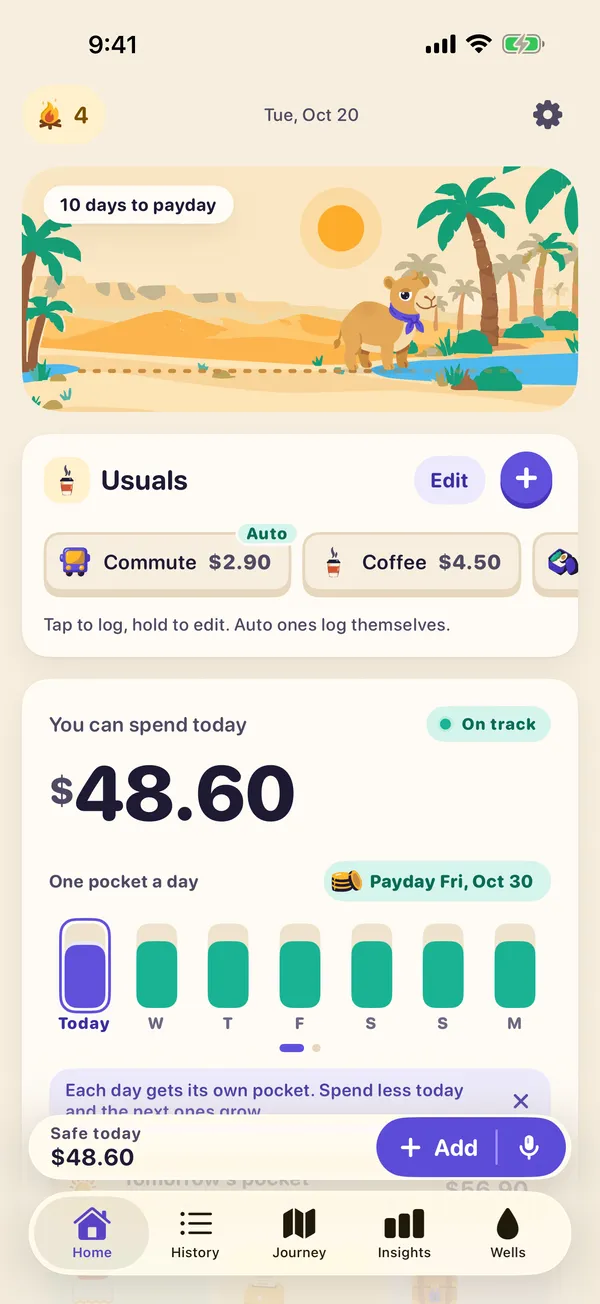
  2. Home: coffee and commute one tap away, you can spend $48.60 today, payday Fri, Oct 30
    2

    Get your number.

    Humph sets bills and savings aside first, then gives each day its own pocket. Spend less today and tomorrow's pocket grows.

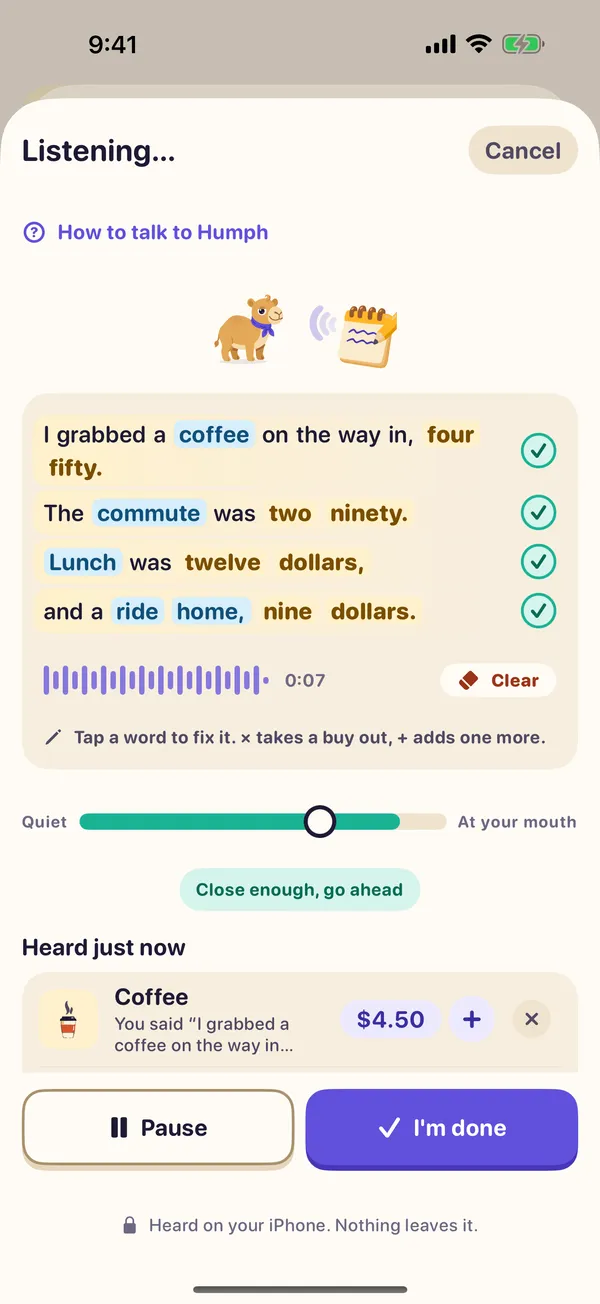
  3. Talking to Humph: a day said out loud becomes coffee, commute and lunch, each with its amount
    3

    Log in a tap, or just say it.

    Tap a usual, or say "coffee 4.50 and lunch 12" and both show up. Regular buys log themselves on their days.

Features

Everything you need to reach payday.

  1. One pocket a day

    Home shows what you can spend today, how many days to payday, and tomorrow's pocket if you spend nothing more.

    Home: coffee and commute one tap away, you can spend $48.60 today, payday Fri, Oct 30
  2. A keypad that adds up

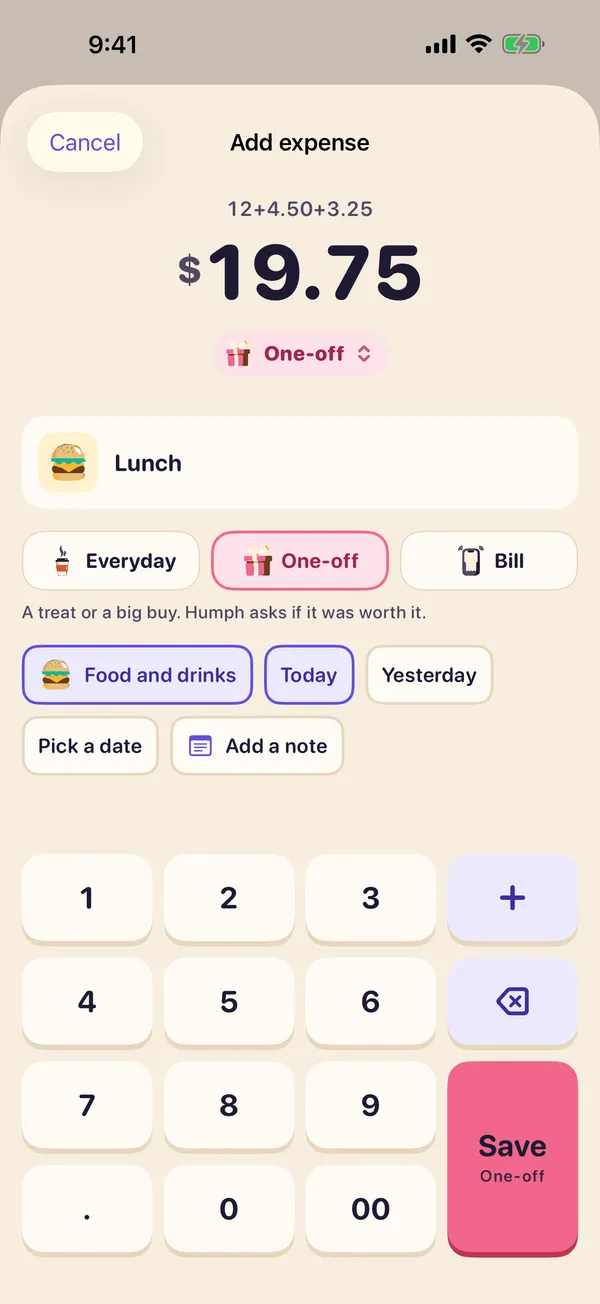
    Name it, tap the amount. Type 12 + 4.50 + 3.25 and Humph adds the whole receipt. Mark big buys as one-offs.

    Add expense: the keypad adds 12 + 4.50 + 3.25 into $19.75 for lunch
  3. Talk to Humph

    Say your day in one go. Humph hears it on your iPhone, splits it into buys and finds each amount. Nothing is recorded or sent.

    Talking to Humph: a day said out loud becomes coffee, commute and lunch, each with its amount
  4. A 30-second check-in

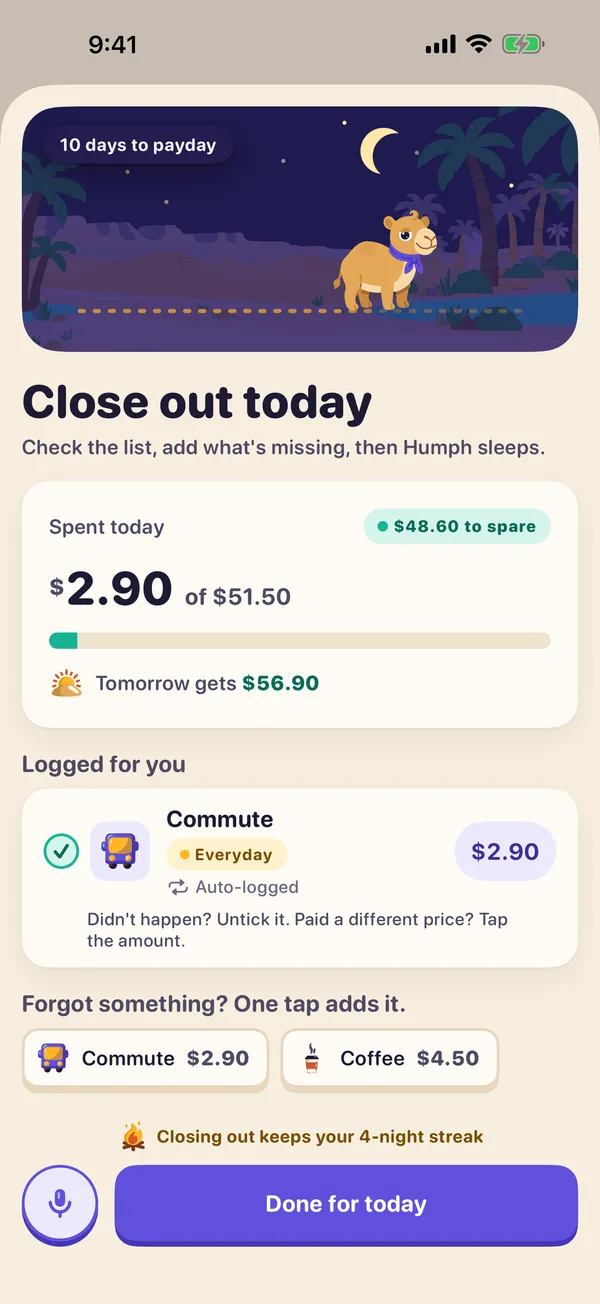
    Each night, untick what didn't happen, add what's missing and see what tomorrow gets. Keep your streak going.

    Close out today: $2.90 spent of $51.50, and tomorrow gets $56.90
  5. Will you make it to payday?

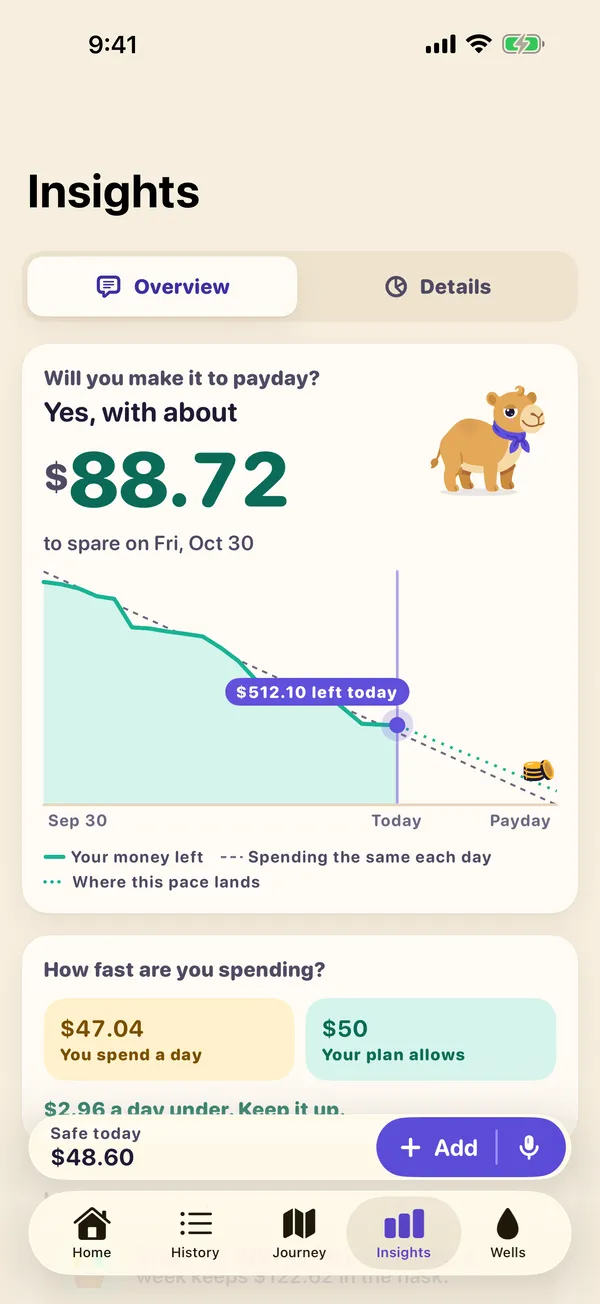
    Insights answers in one line, then shows how fast you're spending and where your money went.

    Insights: will you make it to payday? Yes, with about $88.72 to spare
  6. Wells for savings

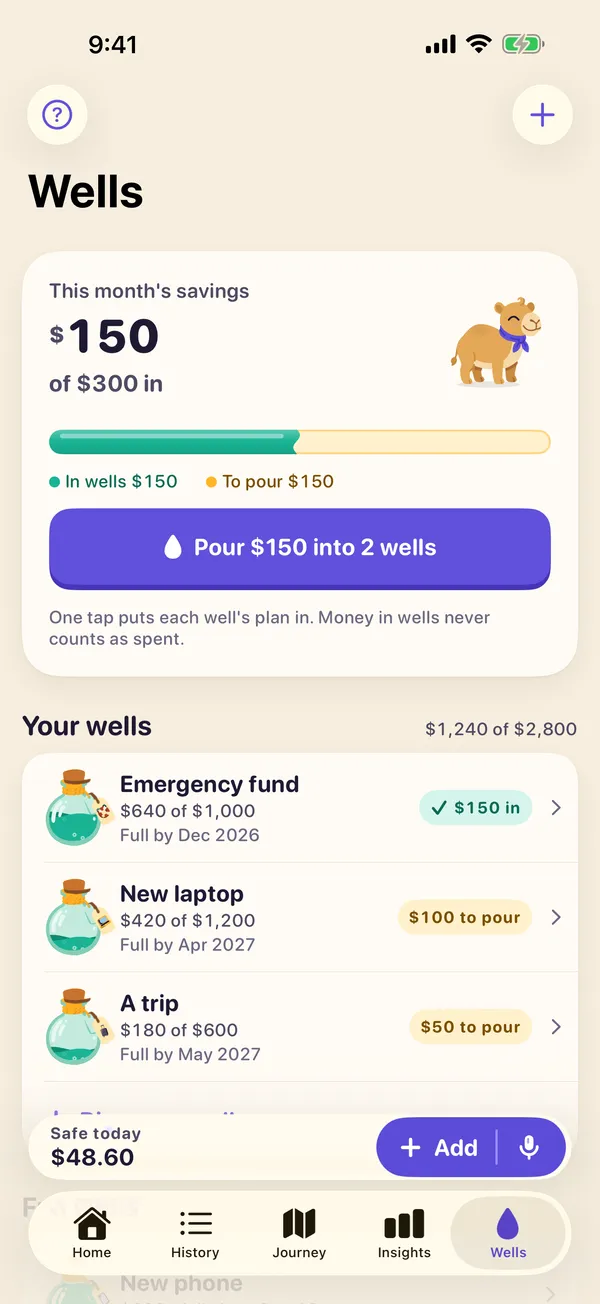
    A well holds one thing you're saving for. On payday, pour your savings in with one tap and watch each one fill.

    Wells: pour $150 of this month's savings into two wells with one tap
  7. Your payday Wrap

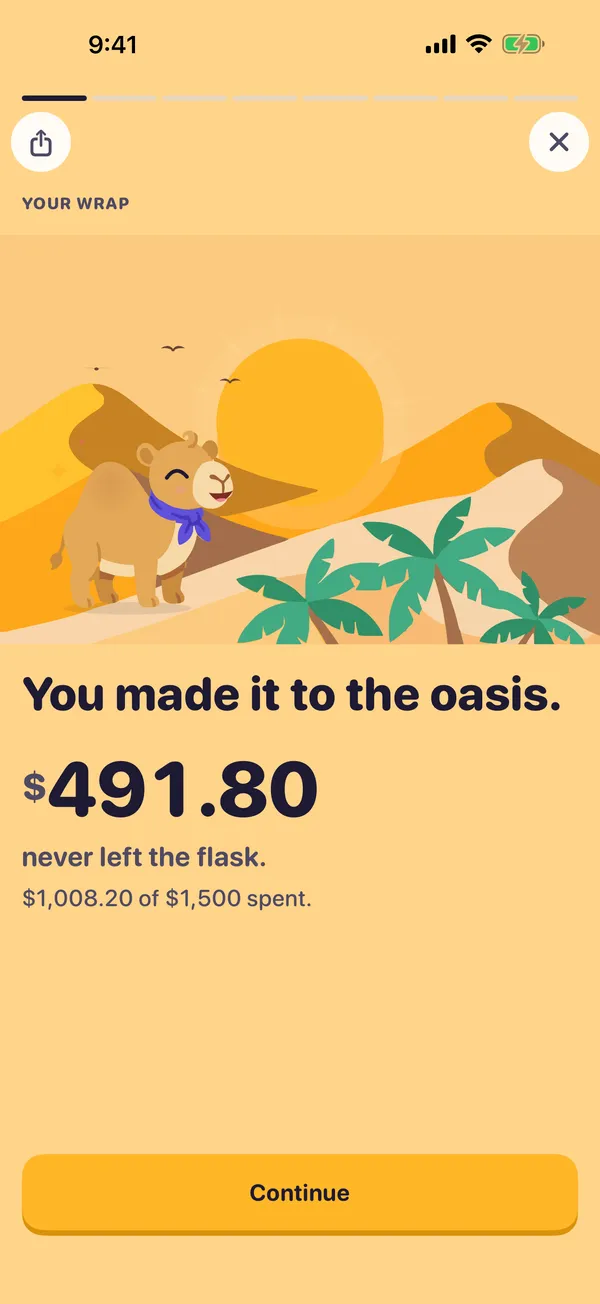
    A short story of your pay cycle: what you kept, where it went, and tips from your own numbers for the next one.

    The payday Wrap: you made it to the oasis, $491.80 never left the flask

Bills, with Paid and Not paid

Each bill has its due day. Humph keeps it out of your daily pockets until it's paid. Tap the pill when it's done.

RentDue on the last day

$1,150

Phone billDue on the 28th

$45

GymDue on the 15th

$30

Paid
$75
Still to pay
$1,150

Log Apple Pay payments (with Shortcuts)

Set up one Wallet automation in the Shortcuts app. When you pay in a store, Humph asks if you want to add it. One tap and it's logged.

Humphnow

Paid $6.75 at Corner Cafe

Add it to today?

In-store payments with any card in Wallet. Card and cash buys still take one tap in the app.

Widgets and Siri

Check today's number from your Home Screen or Lock Screen. Log a usual from the widget without opening the app.

iCloud sync, no account

Your money lives on your iPhone and in your own iCloud, so a new phone picks up where you left off. Export a CSV anytime.

  • No sign-up, no password, no email
  • No bank login needed
  • Any currency, set from your iPhone's region

Meet Humph

Humph wears your budget.

On pace, he struts. Spend fast and he gets thirsty. Go over and he lies down in the sand until tomorrow evens it out. Tap what you'd buy and watch him.

You can spend today

$48.60

Humph is steady. You're on track.

    Rewards

    Make it to payday. Dress up Humph.

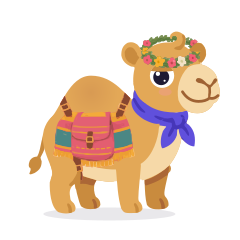
    Every payday you reach with money left earns stars. Stars unlock twelve rewards across your first year: outfits Humph wears on every screen and in your widgets, and themes for the whole app.

    Humph is wearing a flower crown and saddlebags.

    Tap a reward to put it on Humph, tap it again to take it off. Themes color the whole app.

    Swipe for more rewards

    Star counts on monthly pay. More paydays a year earn stars faster.

    Private by design

    Your money stays on your phone.

    No account

    Open it and go. No sign-up, no password, no email, no bank login.

    On your iPhone

    Amounts, titles and notes stay on your device and in your own iCloud. Voice is heard on the phone and never stored.

    No ads, ever

    Humph never sells your data and never shows ads. You pay for the app, so you're the customer.

    Pricing

    Try everything free for 7 days.

    Monthly and yearly both start with a free week. The plan you pick is the plan you pay for, never a pricier one.

    1. TodayFull access. Nothing to pay.
    2. Day 5Humph reminds you the trial ends soon.
    3. Day 7Your plan starts. Cancel before then and you pay nothing.

    Monthly

    $3.99/month

    7 days free first

    Save 37%

    Yearly

    $29.99/year

    $2.50 a month · 7 days free first

    Lifetime

    $59.99 once

    Pay once, keep it forever

    Every plan includes everything

    • Daily pockets and payday countdown
    • Bills with due days and reminders
    • Talk to log, keypad, usuals and regular buys
    • Log Apple Pay payments (with Shortcuts)
    • Nightly check-ins and streaks
    • Insights, History and every past cycle
    • Wells for anything you're saving for
    • The payday Wrap with tips from your numbers
    • Rewards, widgets and Siri
    • iCloud sync and CSV export

    Prices in US dollars. The App Store shows your country's price. Cancel anytime in your Apple ID settings. If you stop paying, everything you saved stays: you can still view it, sync it, export it or delete it.

    Questions

    Good questions, short answers.

    Does Humph connect to my bank?

    No. Humph never asks for a bank login. You log buys in a tap or by talking, your regular buys log themselves on their days, and in-store Apple Pay payments can show up for you to add, through a Shortcuts automation.

    How much does Humph cost?

    Humph is $3.99 a month or $29.99 a year, both with a 7-day free trial, or $59.99 once for lifetime. Every plan includes everything. There's no free tier and no ads. The App Store shows the price in your country.

    What happens when the free week ends?

    The plan you picked starts on day 7, never a pricier one. Humph reminds you on day 5. Cancel before then in your Apple ID settings and you pay nothing.

    What if I stop paying?

    Nothing you saved is lost. You can still open your history, Insights and past Wraps, keep iCloud sync, export a CSV or delete all your data. Adding new buys needs an active plan.

    I'm paid twice a month, every 2 weeks or weekly. Does it work?

    Yes. Humph counts from payday to payday on any of those schedules, and you choose what happens when payday falls on a weekend: the Friday before, the Monday after, or the date itself.

    Does it work in my currency?

    Yes. Humph picks the currency from your iPhone's region, and you can change it during setup. It keeps one currency for all your money.

    Where is my data stored?

    On your iPhone and in your own private iCloud, so a new iPhone picks up where you left off. There's no account. Humph never sends your amounts, titles or notes anywhere.

    Does talking to Humph record me?

    No. What you say is turned into text on your iPhone and never stored or sent. Humph only keeps the buys you confirm.

    How does Apple Pay logging work?

    You set up one Wallet automation in the Shortcuts app; Humph shows you how. When you pay in a store, Humph asks if you want to add it, or adds it for you if you prefer. It works with any card in Wallet. Online and in-app payments, and card or cash buys, are logged in the app.

    Is Humph on Android or the web?

    Not yet. Humph is made for iPhone, with widgets for your Home Screen and Lock Screen and Siri shortcuts.

    Who makes Humph?

    Humph is made by Node and Scale LLC, a small independent studio. Questions or ideas? Write to us from the support page.

    Payday. You made it.

    In Kipling's story, the camel only ever says "Humph!" and ends up with a hump that carries him through lean days. Our Humph carries you to payday.

    For iPhone. 7 days free, then pick monthly, yearly or lifetime.