
The short answer
For a free start, EveryDollar's free version. For a method you practice, YNAB ($109 a year). For every account in one place, Monarch ($99.99 a year). For automatic tracking on iPhone and Mac, Copilot ($109 a year). For what's left after bills with bank sync, PocketGuard ($74.99 a year). For one daily number with no bank login, Humph ($29.99 a year, iPhone only).
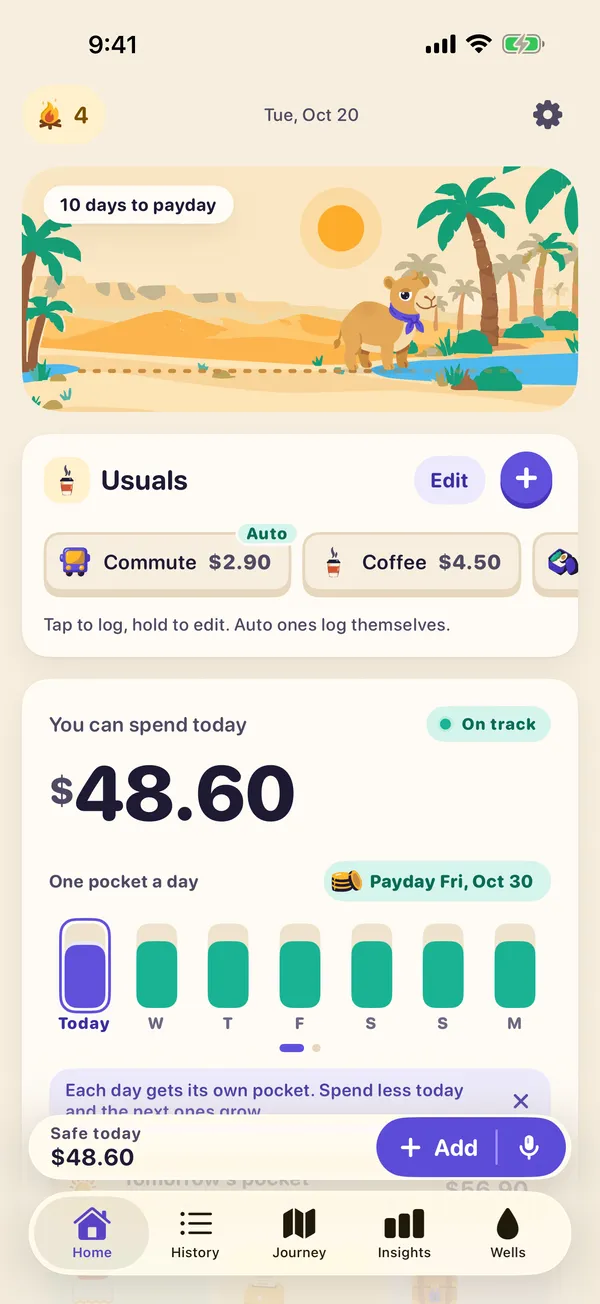
Humph is the pick for one daily number with no bank login. No bank login, no spreadsheets. For iPhone, with a 7-day free trial.


The best budget app for a beginner is the one you'll still open in week three. That depends less on features than on how much work you're willing to do and whether you want your bank linked. We picked six well-known apps and grouped them by the kind of person each one suits, with real prices. Humph is our app, so we've said plainly where it doesn't fit.
Pick by what you want
| If you want | Look at | Price (US) |
|---|---|---|
| A free budget you type in yourself | EveryDollar (free version) | Free; Premium $79.99 a year |
| A method that plans every dollar, shared with family | YNAB | $14.99 a month or $109 a year |
| All your accounts in one place, with a partner | Monarch | $14.99 a month or $99.99 a year |
| Spending imported and sorted for you, on iPhone and Mac | Copilot | $18 a month or $109 a year |
| What's left after bills, from your linked accounts | PocketGuard | $12.99 a month or $74.99 a year |
| One number for today, with no bank login | Humph (iPhone) | $3.99 a month, $29.99 a year or $59.99 once |
Three questions before you choose
- Will you link your bank? Bank import saves typing but needs your login, and connections can break. Manual apps take a few seconds per buy and show each one as it happens. Our guide to budgeting without a bank login covers the trade-off.
- How much time will you give it? A zero-based method like YNAB or EveryDollar asks for setup and a few minutes most days. A daily-number app asks for almost none.
- How are you paid? Most apps budget by calendar month. If you're paid every two weeks or twice a month, an app that counts from payday to payday matches your money better.
EveryDollar: best free start
EveryDollar is the Ramsey zero-based budget. You plan the month's income down to zero, then type in each buy. The free version does that well. Bank sync costs extra with Premium, $79.99 a year. Pick it if you want to learn budgeting without paying. EveryDollar compared with Humph.
YNAB: best method
YNAB asks you to give every dollar a job before you spend it, and to move money between categories when you overspend. It takes effort, and people who stick with it often say it changed how they think about money. One subscription covers up to six people, on iPhone, Android and the web. 4.8 stars from 62,000 ratings in the App Store. A simpler YNAB alternative.
Monarch: best for a full picture
Monarch links bank, card, loan and investment accounts and shows your budget and net worth together. You can plan with a partner. It runs on iPhone, Android and the web, with a 7-day free trial. It's more than most beginners need. Monarch compared with Humph.
Copilot: best automatic tracker
Copilot imports transactions from US banks and sorts them for you, on iPhone, iPad and Mac. You review instead of plan. It's polished, rated 4.8 from 31,000 ratings, and costs the most monthly at $18. Copilot vs YNAB.
PocketGuard: best "left to spend" with bank sync
PocketGuard links your accounts and shows what's left to spend after bills and goals for the month. It has a 4.6 rating from 7,700 ratings and a 7-day trial. PocketGuard compared with Humph.
Humph: best for a first job with no bank link
Humph sets your bills and savings aside, then shows one number: what you can spend today until payday. Spend less today and tomorrow gets more. You log a buy in a tap or by saying it, regular buys log themselves, and there's no account or bank login. It's the cheapest paid pick here.
Where Humph falls short: no bank import, no shared budget, no Android or web, no free tier, and it's new, so it has no App Store rating yet. If any of those matter to you, pick from the apps above. The first salary budget guide works with any of them.
Questions people ask
What is the easiest budget app for beginners?
An app with little setup: one that shows a daily amount after your bills and savings, like Humph, or EveryDollar's free version if you like planning the month.
Which budget apps are free?
EveryDollar has a free version where you type your buys. YNAB, Monarch, Copilot, PocketGuard and Humph are paid after a free trial.
What is the best budget app for young adults?
For a first job, pick one that counts to your next payday and fits a small salary. If you want bank import and a partner, Monarch or YNAB; if you want no bank link, Humph.
Try the daily number
Humph shows what's safe to spend today, every day until payday. For iPhone, with no bank login and a 7-day free trial.
Other apps' prices checked on Nov 10, 2026, in US dollars; check their pages for today's price. General information to help you plan, not financial advice. Examples use US dollars; the same steps work in any currency.


