
The short answer
If you want a budget without linking your bank, Humph is a simpler Rocket Money alternative on iPhone: it sets your bills and savings aside and shows what's safe to spend today until payday. Humph costs $3.99 a month or $29.99 a year after a 7-day free trial. Rocket Money's budgets need Premium, which you price at about $7 to $14 a month. Stay with Rocket Money to find and cancel subscriptions.
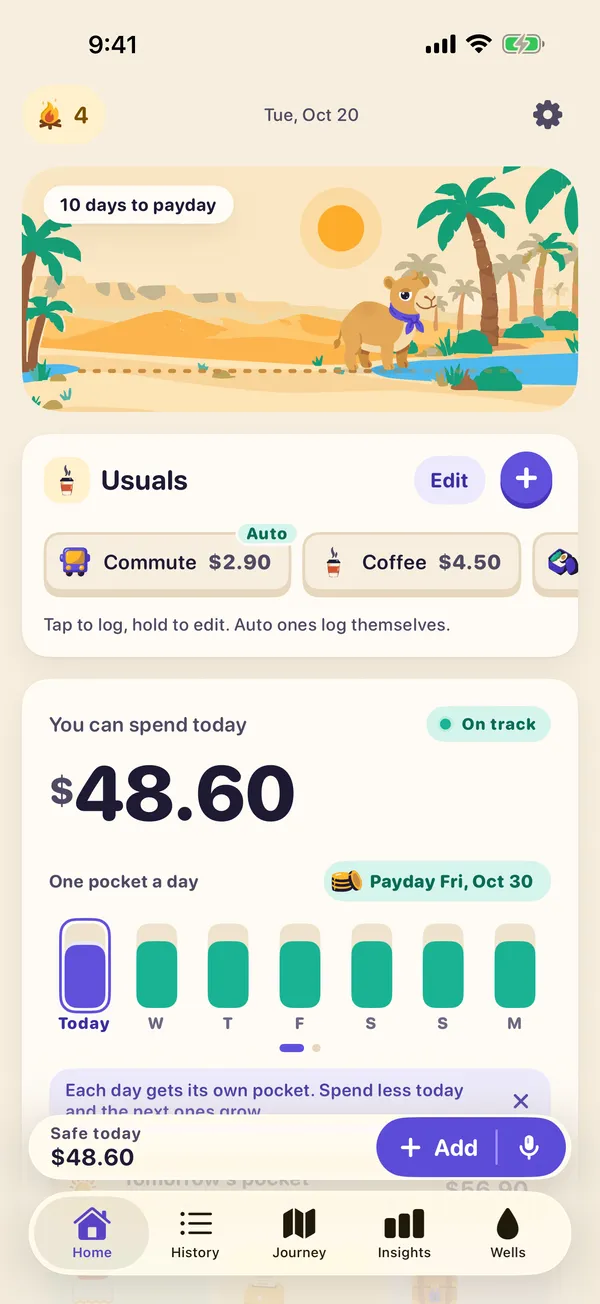
Humph answers one question, what can I spend today, with nothing to link. No bank login, no spreadsheets. For iPhone, with a 7-day free trial.


Rocket Money links your bank and cards through Plaid, finds your subscriptions and can cancel some of them for you. Budgets, manual transactions and the payday view sit in Premium, which you price yourself at about $7 to $14 a month. If you mainly want to know what you can spend today, with nothing to link, Humph is the smaller alternative. Here's how they compare and who should stay with Rocket Money.
Rocket Money and Humph side by side
| Rocket Money | Humph | |
|---|---|---|
| The idea | Find and cancel subscriptions, see all your accounts | One number: what's safe to spend today until payday |
| How buys get in | Bank and card import through Plaid | One tap, the keypad or your voice; regular buys log themselves |
| Bank login | Built around it | None |
| Budgets | Premium | Included: bills and savings first, then a daily amount |
| Typing in a buy yourself | Premium | The main way, in one tap |
| Platforms | iPhone, Android; web with Premium | iPhone, with widgets and Siri |
| Price | Free tier; Premium about $7 to $14 a month, you choose; Premium+ $15 a month | $3.99 a month, $29.99 a year or $59.99 once, after a 7-day free trial |
Why people look for a Rocket Money alternative
- Linking a bank. Rocket Money needs your accounts to work. Some people don't want an app holding that connection.
- The budget sits behind Premium. The free tier tracks subscriptions and spending, but budgets and manual buys need Premium.
- Subscriptions were the only problem. Once the forgotten ones are cancelled, a subscription tracker has less to do. The daily question, can I afford this today, is still there.
Subscriptions found, or a number for today?
Rocket Money looks back at what left your account. Humph looks forward to payday. With $900 left after bills and savings and 18 days to go, Humph shows $50 today. Spend $30 and tomorrow gets $51.18. Your subscriptions sit in Humph as bills with their due days, so they never count as spending money.
How Humph works
- Bills wait for their day. Rent, the phone bill and each subscription stay out of your daily amount until they're paid.
- Savings come first. You pick an amount each payday and it never shows up as spending money.
- Log in a tap, or just say it: "groceries 32 and a ride 9" becomes two buys, heard on your iPhone.
- Apple Pay can log itself. A Shortcuts automation offers each in-store payment for you to add.
- No account. Your data stays on your iPhone and in your iCloud.
Who should stay with Rocket Money
- You want subscriptions found and cancelled for you.
- You want every account and your net worth in one place.
- You want bill negotiation (Premium+).
- You need Android or a web app.
Switching from Rocket Money
- Open Rocket Money's subscriptions list and copy each one, with its price and due day.
- Note your pay after tax and your next payday.
- Pick one amount to save each payday.
- Start logging today. You don't need your old transactions to know what's safe to spend.
Questions people ask
How much does Rocket Money cost?
Rocket Money has a free tier. Premium is pay what you think is fair, about $7 to $14 a month, and Premium+ is $15 a month, as of November 16, 2026. Check Rocket Money's site for current prices.
Can I use Rocket Money without linking a bank?
Rocket Money is built around linked accounts through Plaid; typing in buys yourself is a Premium feature. Humph never asks for a bank login.
Does Humph track subscriptions?
Yes, as bills with a price and a due day. They stay out of your daily amount until they're paid. Humph doesn't cancel them for you.
Try a smaller plan
Humph shows what's safe to spend today, every day until payday. For iPhone, with no bank login and a 7-day free trial.
Other apps' prices checked on Nov 16, 2026, in US dollars; check their pages for today's price. General information to help you plan, not financial advice. Examples use US dollars; the same steps work in any currency.


